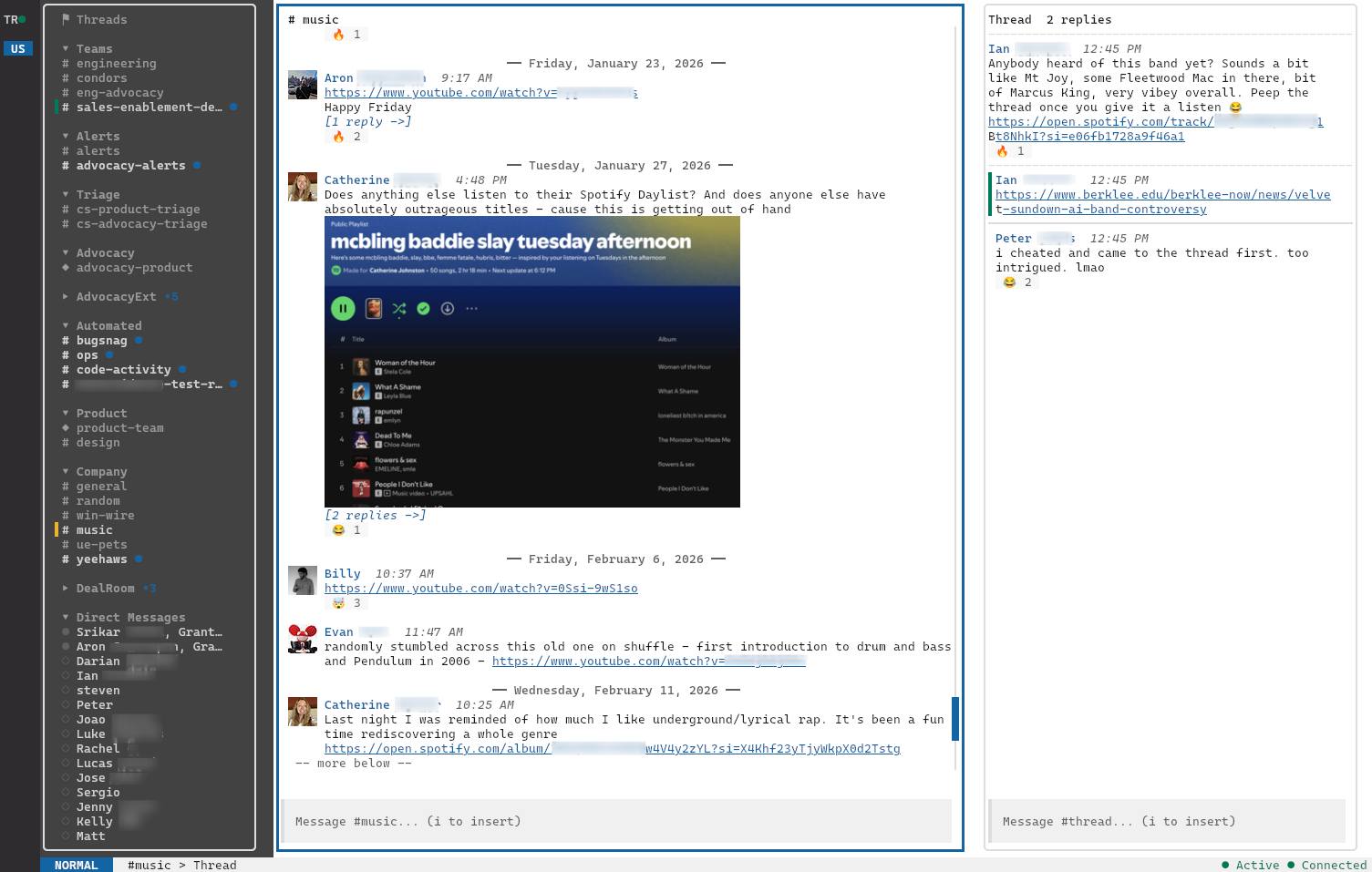
a blazingly fast slack tui
$curl -fsSL
          https://getslk.sh/install.sh | sh
why slk
slk is an open-source, daily-driver TUI Slack client built in Go. One static binary, no Electron, no node_modules. It cold-starts in milliseconds and keeps every workspace connected in parallel.
~500ms
cold start
~60 MB
resident memory
~19 MB
binary on disk
100%
keyboard-driven
what you get
/// realtime
Reactions, edits, deletes, and typing indicators stream in over WebSocket. Optimistic UI for your own actions, SQLite-backed scrollback for everything else.
/// edit, delete, unread
E to edit (your in-progress draft is stashed and restored), D to delete with a centered confirmation, U to roll the read watermark back to any message — threads included, synced live with other Slack clients.
/// markdown compose
Type **bold**, ~~strike~~,
[label](url), - bullets,
1. numbered, or fenced
```code blocks```. slk converts on send to Slack's
mrkdwn + rich_text — already-mrkdwn syntax
(*bold*, _italic_) passes through
unchanged.
/// smart paste
Hit Ctrl+V to paste a clipboard image as an attachment, a copied file path as an attached file, or fall through to text. Multiple attachments + a caption send in one shot via Slack's V2 upload API.
/// threads
Side-panel threads on Enter, plus a dedicated ⚑ Threads view at the top of the sidebar. Every thread you authored, replied to, or were @-mentioned in, unread first, re-ranking live as replies arrive.
/// images
Attachments render where they belong: kitty graphics on capable
terminals, sixel on foot/mlterm, half-block (▀)
everywhere else. Click the image or hit
O for a full-screen preview,
Enter to hand off to your OS viewer.
Lazy-loaded into a 200 MB LRU cache.
/// notifications
OS-level toasts on DMs, mentions, and any keyword you configure. Auto-suppressed when you're focused on the channel, and silenced entirely while you're in DND or snooze.
/// copy
Drag the mouse across messages to highlight them; release to copy plain text straight to the system clipboard via OSC 52, even over SSH.
/// sidebar
slk reads your sidebar sections directly from Slack — names, emoji, order, channel membership — and keeps them in sync over WebSocket. Reorder or rename in the official client; slk catches up in seconds. Falls back to glob-based config sections when you'd rather configure your own.
/// finder
Ctrl+t / Ctrl+p to jump to any channel or DM by name. Collapsible sections with aggregate unread counts; the finder auto-expands a collapsed section when you open a channel inside it, and ranks 1:1 DMs above group DMs.
/// reactions
Hit r to search, R to toggle existing reactions. Pill-style display, optimistic and deduped.
/// workspaces
Every workspace stays connected. Press 1–9 to jump between them with live unread badges.
/// status + dnd
Hit Ctrl+S to set Active, Away, or snooze. Standard durations (20m / 1h / 4h / until tomorrow) or a custom minute count. Status bar shows a live countdown, and reflects external changes in real time.
/// themes
Live-switch with Ctrl+y. Drop your own
TOML in ~/.config/slk/themes/ to add more.
/// keyboard
j/k to move, i to insert, Esc to leave. Bracketed paste, OSC 52 clipboard, no mouse required.
keybindings
Every action is a keystroke or two away. Esc for normal mode, i to insert and compose a message. No menus, no mouse, no modifiers required for the most common actions.
install
One static binary. Pick your platform.
curl -fsSL https://getslk.sh/install.sh | sh
Auto-detects Linux/macOS & x86_64/arm64. Installs to
/usr/local/bin (override with
INSTALL_DIR=…). Read the script first if you'd
rather: install.sh.
VERSION=$(curl -fsSL https://api.github.com/repos/gammons/slk/releases/latest | grep -oE '"tag_name": *"v[^"]+"' | grep -oE 'v[0-9]+\.[0-9]+\.[0-9]+' | sed 's/^v//')
# Apple Silicon
curl -fsSL "https://github.com/gammons/slk/releases/latest/download/slk_${VERSION}_darwin_arm64.tar.gz" | tar xz
# Intel
curl -fsSL "https://github.com/gammons/slk/releases/latest/download/slk_${VERSION}_darwin_x86_64.tar.gz" | tar xz
sudo mv slk /usr/local/bin/
VERSION=$(curl -fsSL https://api.github.com/repos/gammons/slk/releases/latest | grep -oE '"tag_name": *"v[^"]+"' | grep -oE 'v[0-9]+\.[0-9]+\.[0-9]+' | sed 's/^v//')
curl -fsSLO "https://github.com/gammons/slk/releases/latest/download/slk_${VERSION}_linux_amd64.deb"
sudo dpkg -i "slk_${VERSION}_linux_amd64.deb"
VERSION=$(curl -fsSL https://api.github.com/repos/gammons/slk/releases/latest | grep -oE '"tag_name": *"v[^"]+"' | grep -oE 'v[0-9]+\.[0-9]+\.[0-9]+' | sed 's/^v//')
sudo rpm -i "https://github.com/gammons/slk/releases/latest/download/slk_${VERSION}_linux_amd64.rpm"
VERSION=$(curl -fsSL https://api.github.com/repos/gammons/slk/releases/latest | grep -oE '"tag_name": *"v[^"]+"' | grep -oE 'v[0-9]+\.[0-9]+\.[0-9]+' | sed 's/^v//')
curl -fsSLO "https://github.com/gammons/slk/releases/latest/download/slk_${VERSION}_linux_amd64.apk"
sudo apk add --allow-untrusted "slk_${VERSION}_linux_amd64.apk"
VERSION=$(curl -fsSL https://api.github.com/repos/gammons/slk/releases/latest | grep -oE '"tag_name": *"v[^"]+"' | grep -oE 'v[0-9]+\.[0-9]+\.[0-9]+' | sed 's/^v//')
# x86_64 (swap for arm64 on ARM)
curl -fsSL "https://github.com/gammons/slk/releases/latest/download/slk_${VERSION}_linux_x86_64.tar.gz" | tar xz
sudo mv slk /usr/local/bin/
# Download from the latest release page: # https://github.com/gammons/slk/releases/latest # Grab slk_VERSION_windows_x86_64.zip, extract slk.exe, add it to your PATH.
go install github.com/gammons/slk/cmd/slk@latest
Need help authenticating? See the setup guide →